
How to Edit Videos That Get Watched, Shared & Searched in 2026
78% people prefer learning about products through video but the catch is only 31% will finish a poorly-edited one. The rest? Gone — swiping to your competitor, clicking away, or worse, teaching the algorithm your content isn’t worth surfacing.
Editing is no longer about looking slick. It’s about being seen, shared, and searched.
The SMBs winning on social in 2026 don’t have Hollywood budgets or fancy motion graphics. They have intention. Every cut, caption, and hook is a growth decision — designed to keep viewers engaged, boost discoverability, and repurpose one video into five platform-optimized assets.
The old playbook said: hire an editor, add transitions, slap on a logo, post, and pray.
The new playbook says: edit like a growth marketer. Clean captions. Sharp hooks. Purposeful cuts. Choices that drive retention, not ego.
Because reach isn’t about production value anymore — it’s about editing with intention. And that’s what this guide will show you how to do.
What Are Your Editing Intentions? Growth vs. Aesthetics
Before you open your editing app, ask one question: What do I want this video to do?
Not “How do I want it to look?” — but what business outcome am I aiming for?
Most SMBs edit backwards. They obsess over color grading, add transitions because they “look pro,” or stretch intros to showcase their brand. Meanwhile, viewers are leaving, algorithms are burying the video, and the ROI is zero.
Editing with intention flips the script. Every cut serves a goal:
1. Editing for Watch Time
Goal: Keep people watching to the end.
Edits: Ruthlessly cut filler. Add pattern interrupts every 3–5 seconds (text overlays, quick cuts, visual examples). Hold attention, or lose reach.
2. Editing for Shares
Goal: Spark content people want to send.
Edits: Isolate a “shareable moment” in the first 15 seconds. Make it understandable without sound. Keep it short (under 45s works best).
3. Editing for Clicks
Goal: Drive traffic or conversions.
Edits: Front-load the promise. Use text overlays to highlight the value (“This tool saved 6 hours/week”). End with a clean, direct CTA — no fancy outro fluff.
4. Editing for Trust
Goal: Build credibility and authenticity.
Edits: Keep it raw. Show your face. Leave in small imperfections. Add captions for clarity, not polish.
The SMB Reality Check
You don’t have time for 47 transitions. You don’t have budget for motion graphics. And you don’t need them.
A 90-second demo edited for watch time looks completely different than one edited for clicks. Different pacing. Different structure. Different results.
Big brands can afford to edit for aesthetics and hope it converts. You can’t. Every edit has to pull its weight — driving views, engagement, traffic, or trust.
So before you add that swoosh transition, ask: Does this serve my goal, or just look nice? If it’s the latter, cut it.
Choose the Right Platform & Format
A video that crushes on TikTok might flop on LinkedIn. A YouTube Short that goes viral could die as an Instagram Reel.
Why? Because every platform has its own audience expectations and discovery rules. Editing the same way everywhere is like wearing a tuxedo to the beach. Technically fine. Practically wrong.
Here’s how to edit for each platform’s strengths:
TikTok → Hook Fast, Ride Trends
- Payoff first: “Here’s the $12K mistake we made” beats “Today we’re talking about budgeting.”
- Use trending sounds and effects — the algorithm favors participation.
- Cut every 2–3 seconds; add text overlays for sound-off viewers.
- Aim for 15–45s unless longer videos prove retention.
SMB win: A local coffee shop hit 400K views with “3 menu hacks your barista won’t tell you” — straight to value, trending sound, 19s long.
YouTube → Play Two Games
- Long-form (8+ min): Hook in first 5s, use chapters/timestamps, break monotony with B-roll/graphics, add captions.
- Shorts: Vertical 9:16, hook + payoff in <60s, text overlays for context, avoid outbound CTAs (algorithm penalizes exits).
SMB tip: Repurpose long-form into 3–5 Shorts. One tutorial = multiple hooks. One interview = multiple clips.
Instagram → Reels & Carousels
- Reels: 30–60s, text hooks, strong CTA in captions.
- Carousels: Repurpose video into 7–10 slides. Carousels often outperform Reels in B2B niches for saves/shares.
- Combo play: Drop a Reel, then 2 days later post a carousel breaking it down. One video → double reach.
LinkedIn → Professional, But Human
- Short explainers (30–90s) that teach value.
- Minimal transitions, clean talking head.
- Captions are critical (most people scroll at work, sound off).
- Native uploads > YouTube links (5x better reach).
SMB win: A fractional CFO posts 60s breakdowns of cash flow mistakes — simple captions, raw delivery, 8–12 leads per video.
How bluekonaAI Makes It Smarter
You can follow best practices and still miss. Maybe your LinkedIn audience prefers TikTok-style cuts. Maybe your Instagram followers binge long-form.
bluekonaAI audits your historical data to show what actually works for you:
- Which platform delivers the longest watch times?
- Do quick cuts or slower pacing hold attention?
- Which formats generate the most saves, shares, or clicks?
Instead of guessing, you edit based on proof. Because the best platform isn’t the one with the biggest user base — it’s the one where your audience actually watches, engages, and converts.
Ideate, Script, Create (with Intention)
Great editing can’t save a weak idea. But a strong idea, paired with intentional scripting and resourceful creation? That’s how SMBs with limited budgets compete with brands spending 10x more.
The key is working smarter before you ever hit record.
1. Ideation: Find What’s Already Working
Don’t ask, “What should I post?” Ask, “What’s already getting attention in my space?”
- Trend scan: Check TikTok’s Discover, Instagram’s Explore, and YouTube Shorts. Look for repeatable formats (e.g., “5 things I wish I knew…”), not just trending topics.
- Hashtags & sounds: Search the tags your customers follow (#smallbusinesstips, #solopreneur). Note which ones drive engagement, not just views. Early adoption of trending sounds = algorithmic boost.
- Competitor check: Study 3–5 accounts one step ahead of you. Sort by “most popular” and analyze hooks, length, and pacing. You’re not copying — you’re learning what resonates with your shared audience.
How to use bluekonaAI: Surfaces your content gaps (topics and formats other creators in your niche use but you don’t) and spotlights your own top performers so you can double down on what’s proven.
2. Script: Structure Beats Spontaneity
“I’ll wing it” usually means rambling, weak hooks, and wasted time. A simple script makes editing faster and outcomes stronger.
- Hook (first 3s): Lead with payoff, question, or bold claim.
- Promise (next 5s): Tell viewers exactly what they’ll learn.
- Body (30–60s): Deliver 3–5 clear points, each paired with a visual or example.
- CTA (last 5s): One clear action. No multi-step CTAs.
Caption planning tip: Write captions before you shoot. That way, spoken words and on-screen text reinforce each other and accessibility is baked in, not bolted on.
3. Create: Align With SMB Resources
You don’t need a DSLR or studio. You need clarity, stability, and sound.
- Good enough gear: Phone (iPhone 11+ or equivalent), natural light + cheap reflector/LED, $20 lav mic, tripod or stack of books.
- Production specs:
- TikTok/Reels/Shorts → 9:16 vertical, 1080×1920, 30fps.
- YouTube long-form → 16:9 horizontal, 1080p (4K optional).
- LinkedIn → 1:1 or 16:9, 1080p.
- Efficiency hacks: Record in short takes, shoot vertical and horizontal if repurposing, film multiple hooks for A/B testing, capture B-roll for reuse across videos.
How to use bluekonaAI: Shows which production styles your audience responds to (e.g., talking-head vs. screen recording, raw clips vs. polished edits) so you stop assuming and start editing based on proof.
The Intention Thread
Notice the through-line: ideation, scripting, and creation all tie back to your editing goal.
- Editing for watch time? → Script tight, shoot short takes, keep the pace fast.
- Editing for shares? → Script the “aha moment” first, create visuals that pop without sound.
- Editing for clicks? → Script a strong CTA, create with branding that directs traffic.
By the time you sit down to edit, 70% of the work is done. You’re not “fixing it in post” — you’re assembling pieces designed to perform.
That’s how SMBs scale content without sacrificing results. Intention from ideation through creation means faster production and edits that actually grow your business.
Editing That Keeps Viewers Watching
Here’s the brutal truth: every unnecessary second is a chance for viewers to leave. Every pause, slow intro, or flashy transition is a dropout risk.
Algorithms don’t care how long you spent color-grading. They care about one thing: did people watch until the end?
Editing for retention isn’t about making videos prettier. It’s about removing every reason to scroll away.
1. Clean Captions: Non-Negotiable
- 80% of social video is watched without sound. If your video needs audio to make sense, you’ve lost.
- Readable: Clean font, high contrast, large enough for mobile.
- Accurate: Auto-captions are a start — fix errors, match spoken rhythm.
- Strategic: Highlight key phrases, time captions as subtle pattern interrupts.
Protip: captions aren’t just for accessibility. They’re a retention tool.
2. Minimal but Strategic Cuts
- Cut dead air, filler, and slow moments.
- Change visuals to reset attention (angle shifts, B-roll, screen recordings).
- Use the “trim test”: rewatch and try cutting 10% of runtime. If clarity survives, so should the cut.
Rule of Thumb: Every cut should either remove fluff, show something new, or reset attention. Nothing else.
3. Authentic Beats Over-Polished
- Keep small imperfections (laughs, stumbles, candid reactions). They build trust.
- Overproduced looks like an ad. Raw feels real.
- Big brands chase polish. SMBs win by leaning into authenticity.
4. Transitions & Music: Keep Them Invisible
- Best transitions: hard cuts > simple dissolves > everything else (swipes, spins, wipes = scroll fuel).
- Music: supportive background only. Use trending sounds on TikTok/Instagram, royalty-free on YouTube/LinkedIn. Silence is better than bad music.
5. Purposeful Editing = Retention
Before every edit, ask: Does this keep viewers watching?
- Logo intros? Cut them.
- Fancy transitions? Cut them.
- Montages? Keep only if they teach or build trust.
How to use bluekonaAI?
Most SMBs edit blind — hoping their hooks land and CTAs get watched. bluekona AI removes the guesswork:
- Shows where your audience leaves (e.g., “68% dropped at 12s”).
- Reveals spikes (e.g., “maximum engagement at 0:22”).
- Tracks average watch time vs. length.
This creates a feedback loop: edit → publish → analyze → re-edit smarter. Over time, you learn what keeps your audience watching — not generic best practices, not MrBeast tricks.
The Retention Mindset
Retention isn’t about cutting short videos. It’s about making every second count. The algorithm rewards completion rate and watch time, not brevity.
Remove reasons to leave. Add reasons to stay. Make it effortless to watch. That’s editing for growth — and it’s a game SMBs can win.
Optimize for Discovery (Social SEO Layer)
You can edit the perfect video—tight pacing, strong hook, high retention—and still get zero views if nobody can find it.
This is the layer most SMBs skip: discoverability.
Platforms are now search engines. YouTube always was, TikTok’s search traffic is exploding, and even Instagram and LinkedIn are pushing discovery feeds over follower feeds.
If your video isn’t optimized for search and recommendations, it’s invisible.
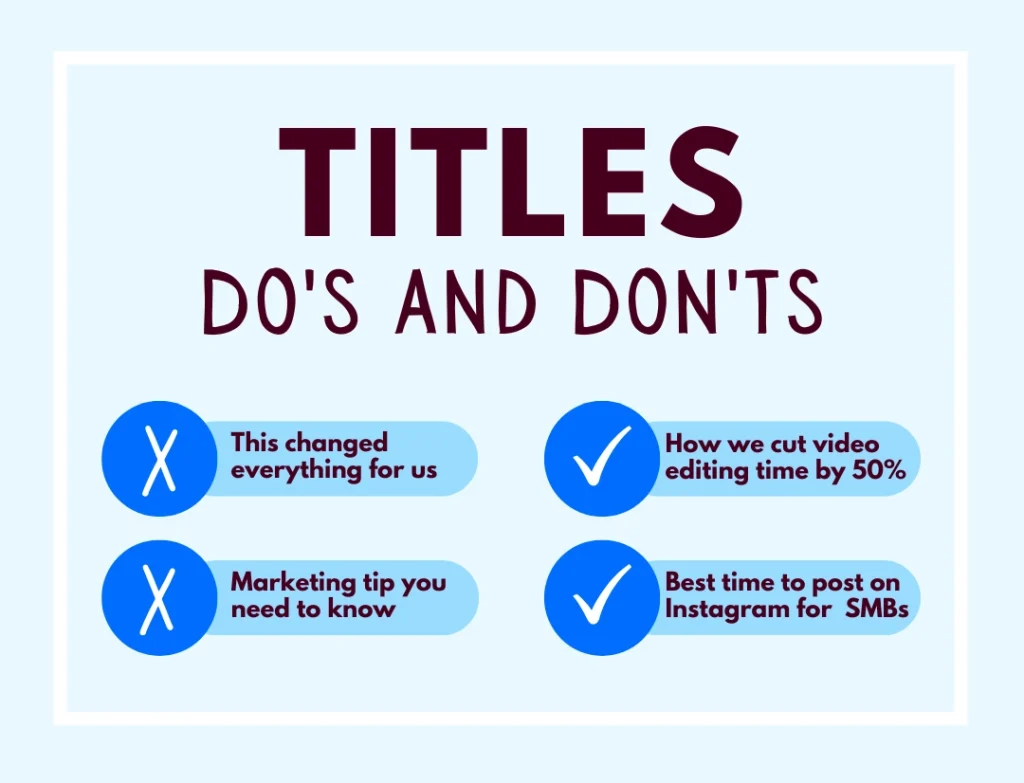
1. Search-Style Titles & File Names
Your title isn’t creative writing. It’s a search query.
Formula: [Action/Outcome] + [Specific Topic] + [Qualifier/Year]
File names matter too: rename before uploading.
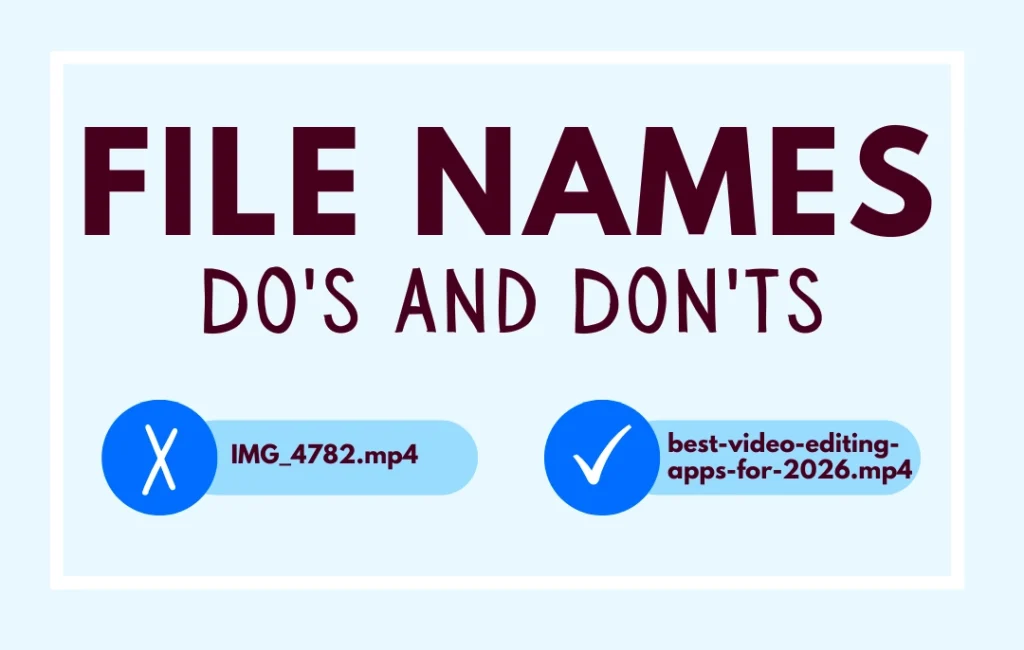
Give algorithms every possible signal that your content matches search intent.
2. Transcripts, Captions & Alt Text
Algorithms don’t “watch” your video — they scan text.
- Transcripts: Upload full transcripts on YouTube and LinkedIn. YouTube indexes every word.
- Captions: Beyond accessibility, captions include searchable keywords. Write them strategically.
- Alt text: On Instagram/LinkedIn, describe what’s happening in the video: “3-step editing workflow in CapCut for SMB owners.”
3. Platform-Native Hashtags & Tags
Different platforms treat hashtags differently:
- TikTok: 3–5 hashtags, mix broad (#SmallBusiness) + niche (#SMBGrowth) + trending (if relevant).
- Instagram: 5–10 hashtags. Mix smaller (10K–100K), mid (100K–500K), and broad (500K+).
- YouTube: Tags matter less, but 5–8 still help with “related videos.” Focus on title/description first.
- LinkedIn: 3–5 hashtags max. Pick ones your audience follows (#SaaS, #SmallBusiness). Avoid generic (#Marketing).
Pro move: research by searching your topic and studying which hashtags appear in top-performing videos.
4. Use bluekonaAI: Data-Driven Discoverability
Best practices are guesses. Your audience is the truth.
bluekonaAI tracks:
- Which title styles pull more impressions (e.g., “How to…” vs. “Best [tool] for…”).
- Whether adding the year boosts clicks.
- Which hashtags drive reach, profile visits, or conversions.
- What search terms people use to actually find your content.
This creates a feedback loop:
Post → Analyze tags/titles in bluekona → Double down on winners → Test one new variable → Repeat.
5. The Compound Effect of Discovery
A video without SEO might get 500 views (your followers).
The same video, optimized with the right title, transcript, and tags, might hit 5,000 — found by people who weren’t even looking for you.
Better yet: discoverability compounds. A search-optimized video keeps pulling views for months, sometimes years. Every extra view feeds more data to the algorithm, extending your reach.
Your editing keeps people watching. Your SEO gets them there. Do both, and every video becomes a growth asset instead of a one-and-done post.
Publishing & Scheduling (Timing Matters)
You’ve ideated, scripted, and edited a strong video. Now comes the decision that can double your reach—or bury your work: when and how often you publish.
Timing isn’t superstition. It’s strategy. Post when your audience is online, and platforms reward you with reach. Post when they’re asleep, and your video dies before it gets traction.
1. Post at Optimal Audience Times
Forget “best time to post” charts. They’re averages across millions of accounts. Your audience is unique.
What really matters:
- When they scroll: B2B = work breaks (7–9 AM, 12–1 PM, 5–7 PM). B2C = evenings/weekends. Local = local time zones.
- First-hour engagement: Platforms test new content with a small audience. Early engagement = wider push.
- Competition levels: Sometimes off-peak hours outperform crowded peak times.
How to find your times:
- Check analytics: TikTok (Follower Activity), Instagram (Most Active Times), YouTube (When Viewers Are On), LinkedIn (post analytics).
- Test 3–4 time slots over 2–3 weeks, track which deliver the fastest early engagement, then double down.
bluekonaAI Advantage: Instead of guessing, bluekona shows exactly when your posts historically got the most reach, shares, and watch time (e.g., “Tuesday 8 AM posts get 40% more shares than Thursday 6 PM”).
2. Balance Frequency vs. Burnout
Consistency matters more than intensity. Daily posting sounds great—until you quit after 3 weeks.
Frequency benchmarks:
- TikTok/Reels → 3–5x per week (daily if sustainable).
- YouTube Shorts → 3–4x per week.
- YouTube long-form → 1–2x per week.
- LinkedIn → 2–3x per week.
The burnout test: If posting makes you cut corners, dread content creation, or neglect your business—you’re overdoing it. Better to post 3x/week for a year than daily for a month and burn out.
3. Repurpose One Video into Many
This is the SMB superpower: scale output without scaling workload.
One video → 3–5 edits:
- YouTube long-form → repurpose into Shorts.
- TikTok → 15s highlight with trending sound.
- Instagram → 30s teaser + carousel breakdown.
- LinkedIn → 60s educational clip with captions.
Workflow:
- Record master video (60–180s).
- Identify 3–5 “clip-worthy” moments (hooks, insights, demos).
- Re-edit each clip for its platform (style, caption, aspect ratio).
- Adjust CTAs per platform behavior.
80% of the content is the same. 20% is platform-specific.
4. Tools & Systems
- Free: Meta Business Suite, YouTube Studio, LinkedIn scheduler.
- Paid: Later, Buffer, Hootsuite for multi-platform. Repurpose.io to automate clips.
- Batching: Record 2–4 videos in one session, edit masters, repurpose clips, schedule 2–3 weeks of content at once.
Optimize Posting Strategy
Generic advice can’t answer:
- Should you post 3x or 5x weekly?
- Do your 7 AM posts outperform 6 PM?
- Are your videos cannibalizing each other if posted too close together?
bluekonaAI analyzes your history to find:
- Best-performing time slots.
- Frequency sweet spots (where reach grows without quality slipping).
- Engagement patterns unique to your audience.
Publishing isn’t just logistics. It’s a growth lever. Post at the right time, at a sustainable frequency, and repurpose ruthlessly — and every video becomes 5x more valuable.
Engagement & Analysis
Publishing isn’t the finish line — it’s the starting gun. The first few hours after you post decide whether your video reaches 500 people or 50,000. And your analytics decide whether the next one performs better, or you just keep guessing.
1. Respond, Comment, Engage (First Hour = Critical)
- Reply fast: Respond to every comment in the first hour. Even a “thanks!” counts as engagement.
- Pin smart comments: Highlight a question or great insight to spark more discussion.
- Ask questions in captions: Specific prompts (“Which tool do you use — CapCut or Descript?”) drive more comments than vague “What do you think?”
- Cross-promote: Share your video to Stories or groups immediately to funnel early traffic.
- Engage outward: Comment on 5–10 posts in your niche — algorithms notice cross-engagement.
Why it matters: Platforms test your video with a small batch first. If that group engages quickly, the algorithm pushes it further. If not, it dies quietly.
2. Metrics That Actually Matter
Forget vanity metrics like raw views. The growth levers are:
- Watch time: #1 algorithm signal. Aim for 50%+ completion on short-form, 40%+ on long-form.
- Saves: Proof your video is valuable enough to revisit. Heavily weighted on Instagram.
- Shares: Built-in distribution. Each share = exposure to a new network.
- CTR (Click-Through Rate): Converts attention into action (profile visits, site clicks, lead forms).
- Engagement rate: (Likes + Comments + Shares) ÷ Reach. A composite score of resonance.
Track per platform, but look for trends across them.
bluekonaAI Advantage: Proof of What Works
Most SMBs don’t know if their editing tweaks actually made a difference. bluekonaAI closes that gap by showing:
- Before/after impact: “After adding captions, watch time rose 18%.”
- A/B tests: “New hook style improved 10-second retention by 22%.”
- Drop-off diagnostics: “68% of viewers left at 12s — cut or move that section.”
- Trend spotting: “Your most-shared videos all follow this structure…”
Instead of guessing, you edit based on data from your audience — not generic best practices.
The Engagement & Analysis Workflow
- After posting: Engage in the first hour → respond, pin, cross-promote.
- Weekly (15 min): Review last 5–7 videos. Spot patterns (hooks, length, style). Apply 1 insight.
- Monthly (30–45 min): Audit top 10 vs. bottom 5. Double down on what works. Cut what doesn’t.
- Quarterly (1–2 hrs): Zoom out. Is watch time improving? Are shares increasing? Are you reaching the right audience? Reset benchmarks.
The Compounding Effect
Treat analytics like a conversation, not a report card. Each video teaches you: what to trim, what to amplify, what to repeat.
Do this consistently, and the growth compounds:
- Month 1: You learn shorter hooks retain better.
- Month 2: Retention improves → reach expands.
- Month 3: Certain hooks double shares.
- Month 6: You’ve built a data-backed editing playbook unique to your SMB.
Bottom line: Engage to signal value. Analyze to prove what works. Use bluekonaAI to close the loop. That’s how your videos stop being one-off posts and start compounding into real growth.
Tools That Make It Easier (SMB-Friendly)
You don’t need Premiere Pro. You don’t need Final Cut. You don’t need a $2,000 software license or 40-hour tutorials.
What SMBs need are fast, affordable tools that handle the editing that matters most: clean captions, tight cuts, and content formatted for the right platform.
Here’s the tool stack that works for real businesses:
CapCut: The Free Workhorse
- Best for: TikTok, Instagram Reels, YouTube Shorts
- Price: Free (Pro $9.99/mo)
- Why SMBs use it: Mobile + desktop editing, auto-captions, trending effects, and multi-track editing without the learning curve.
- Growth features:
- Auto-captions (95%+ accurate → edit, don’t type)
- Silence removal (cuts dead air automatically)
- Speed controls (1.2x trim = tighter pacing)
- Templates (hooks/transitions for beginners)
When to use: Your default short-form editor.**
When to skip**: You need advanced color grading or multi-camera syncing.
Descript: Edit Video Like a Document
- Best for: YouTube, LinkedIn, podcasts, tutorials, talking-head content
- Price: Free (limited), Creator $12/mo, Pro $24/mo
- Why SMBs use it: Edit by deleting words from a transcript. AI removes filler words, cleans audio, and even generates overdubs.
- Growth features:
- Filler word removal (kill “ums” with one click)
- Studio Sound (AI cleans echo/noise)
- Auto-captions + transcript export
- Repurpose 10-min videos into multiple clips
When to use: Long-form editing, webinars, tutorials, interviews.**
When to skip**: Fast-turnaround viral shorts (CapCut is faster).
Canva: The Swiss Army Knife
- Best for: Thumbnails, branded overlays, carousels, simple video edits
- Price: Free, Pro $12.99/mo
- Why SMBs use it: Drag-and-drop templates + stock footage. If you can make a PowerPoint, you can edit video here.
- Growth features:
- Resize for multiple platforms instantly
- Brand kit for consistent fonts/colors/logos
- Templates for hooks, intros, captions
When to use: Quick explainers, carousels, branding polish.**
When to skip**: Precision editing or pacing adjustments.
InShot: Mobile-First Editing
- Best for: On-the-go content, phone-shot clips
- Price: Free (watermark), Pro $3.99/mo or $14.99/year
- Why SMBs use it: Edit and post directly from your phone, no transfer needed.
- Growth features:
- Speed control + simple text overlays
- Aspect ratio switching (vertical, square, horizontal)
- Voice-over recording directly in app
When to use: You’re shooting/editing on your phone between client meetings.**
When to skip**: You need captions or more advanced features (CapCut wins).
The Tool Stack by SMB Scenario
- Solo founder on TikTok/IG Reels → Phone + CapCut → Schedule via Meta → Analyze in bluekonaAI.
- Marketing manager on LinkedIn → Shoot on webcam → Edit in Descript → Brand polish in Canva → Analyze in bluekonaAI.
- Small team on YouTube → Shoot DSLR/phone → Edit long-form in Descript → Shorts in CapCut → Thumbnails in Canva → Analyze in bluekonaAI.
- Service business creating on-the-go content → Shoot + edit in InShot → Repurpose in CapCut → Analyze in bluekonaAI.
Editing tools make videos. bluekonaAI makes them perform.
- CapCut shows you how to add captions.
- Descript shows you how to remove filler words.
- Canva shows you how to brand your video.
- InShot shows you how to trim and post fast.
But none of them tell you which edits actually worked.
That’s where bluekonaAI sits on top of your workflow:
- “Videos with captions had 22% higher watch time.”
- “Retention spikes when you show screen demos—use more.”
- “Your 45-second clips get shared 3x more than 90-second ones.”
Instead of editing blind, you edit with proof.
The Anti-Tool-Hopping Rule
Most SMBs waste weeks switching tools thinking it’ll fix their views. It won’t. The bottleneck isn’t the tool—it’s whether your edits serve retention, shares, clicks, or trust.
Pick 1–2 tools. Learn them deeply. Use bluekonaAI to measure whether your edits are actually moving the needle.
Bottom line: Tools make editing easier. bluekonaAI makes it smarter.
Edit Like a Growth Marketer, Not a Filmmaker
Video editing used to be about looking polished. In 2026, it’s about performing.
The SMBs winning on social aren’t using Hollywood gear or cinematic transitions. They’re making business-driven editing choices: every cut, caption, and hook designed to keep people watching, sharing, and searching.
You don’t need fancy effects. You need smart, intentional edits backed by data:
- Edit for goals (watch time, shares, clicks, trust)
- Match platform + format
- Script and shoot with intention
- Cut ruthlessly to remove dead air
- Optimize for search and discoverability
- Post at the right times, repurpose across channels
- Engage early, analyze often
- Learn from every video
Because growth compounds: your 10th video should outperform your 1st — not because of gear, but because you learned what keeps your audience watching.
But you can’t improve what you don’t measure. That’s where bluekonaAI comes in.
It shows you:
- Where viewers drop off
- Which edits boost retention
- What formats drive shares
- Which titles, tags, and times improve discoverability
- Whether your editing changes actually worked
The result? Videos that don’t just get views — they build trust, drive clicks, and fuel your business. One video becomes five assets. Each asset compounds growth.
Ready to stop guessing and start growing? bluekonaAI shows you what edits actually move the needle — so every video works harder for your business.